
NutriTrace
Self-hosted personal nutrition and calorie tracker
Alternative to: myfitnesspal, cronometer, lose it, waistline
v1.2.0-dev02
2026-08-10Second dev pre-release of the 1.2.0 minor, and a substantial one. Every major page (Diary, Foods, Settings, Wellness, Statistics, Goals) now has a proper large-screen layout with rails, wider content areas, and page-specific extras like drag-to-copy meals and click-to-drill charts. Editors get a two-column layout. Deep-links wire the whole app to Statistics. AI model presets are refreshed to current generations. Opt-in trace-level request diagnostics arrive server-side. A handful of long-standing bugs also get fixed, notably an Android pull-to-refresh that fired mid-page.
Note on the large-screen redesign. This is a first pass. Every page listed under “Large-screen layouts” below is expected to change further as feedback comes in and as I keep using it myself. If a widget placement, rail behavior, or interaction feels off, please open a Discussion or an issue with a screenshot; nothing here is locked in.
Added
Large-screen layouts (first pass, iterating)
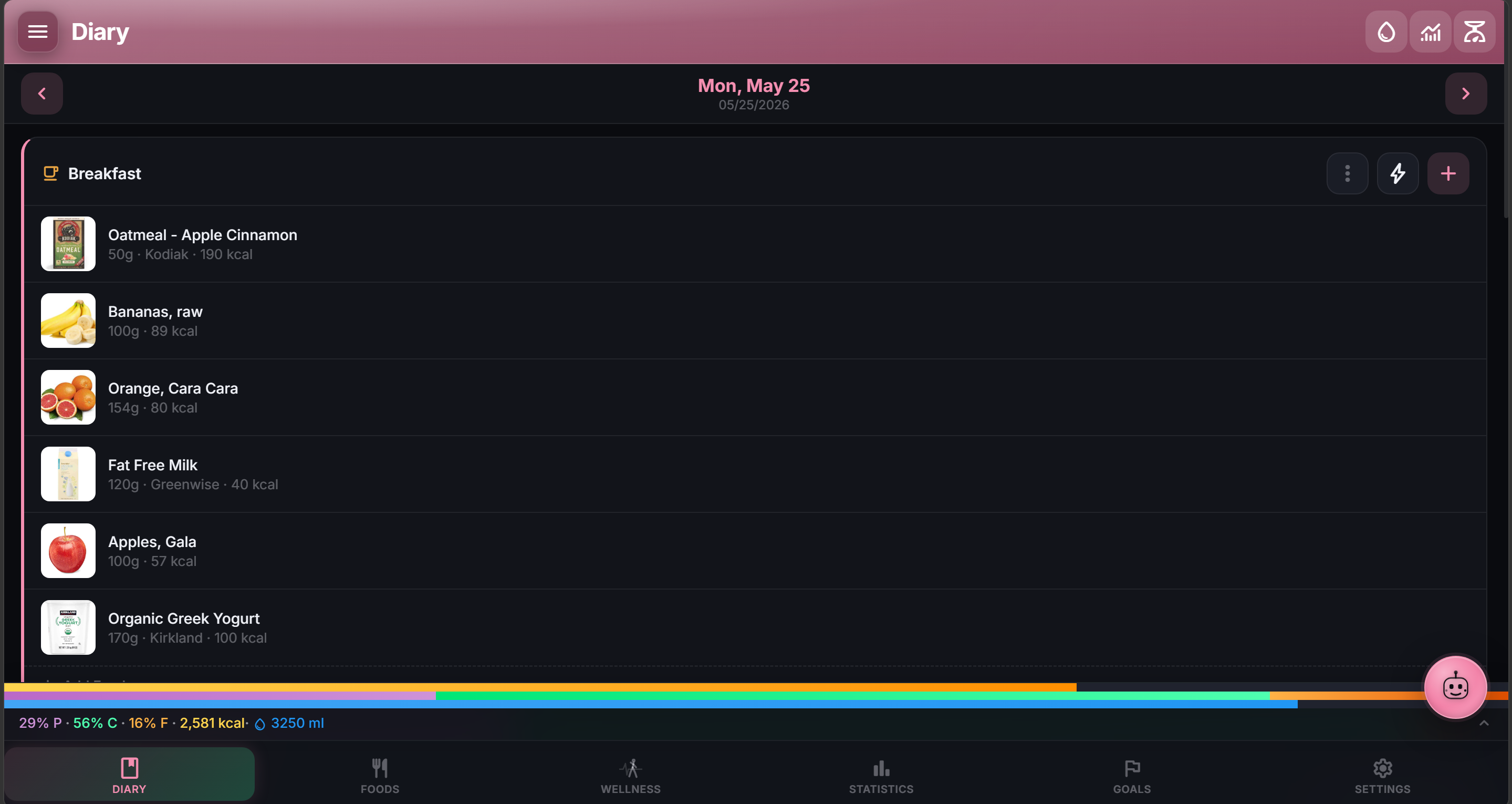
- Diary large-screen layout. Two-column shell with a Day Summary widget that mirrors the full Nutrition Summary sheet (same numbers, same layout, same % vs g toggle). Right rail carries Water, Body Stats (merged Weight + Measurements), Notes, and configurable per-widget visibility toggles. 7-day week strip anchors on the viewed date (not real-world “today”) with a hover preview that respects your Date Format preference. Drag meals onto week-strip days to copy them forward. Drag items between meals within the same day. Nutrient widget in the rail excludes calories / protein / carbs / fat (those already live in the Day Summary). All configured Water containers render (not just the first three). A “Weekly trend” indicator sits on the Day Summary KPI strip (rolling 7 days vs previous 7).
- Foods large-screen layout. Left filter rail, wider detail pane, adjusted grid, bottom-nav clearance, rail empty state.
- Settings large-screen layout. Two-pane shell with an always-visible search bar. Sections regrouped for scannability across Diary, Appearance, Regional/Foods, Statistics/Water/Nutrients/Sharing, Notifications/Backup/Import-Export, and Components. Profile becomes a first-class rail section that inline-expands in the welcome hero. Cross-fade between sections.
- Wellness, Statistics, and Goals large-screen layouts. Each page gets a left rail (providers / metrics / your goals), a wider content area, and (where useful) a right rail (insights / detail / drill-in). Rails collapse cleanly on narrow screens.
- Editor two-column layout. FoodEditor and MealEditor gain a sticky left column on wide screens plus a two-column nutrition grid; Show All Nutrients now slides open.
- Force Mobile Layout toggle. New Settings option turns every large-screen layout above off entirely and falls back to the single-column mobile view app-wide.
Statistics deep-linking + polish
- Deep-link into Statistics from anywhere. Diary’s Day Summary, every Wellness metric card, and every Goals row now have a “View trend” affordance that jumps to Statistics with the right metric and range preselected.
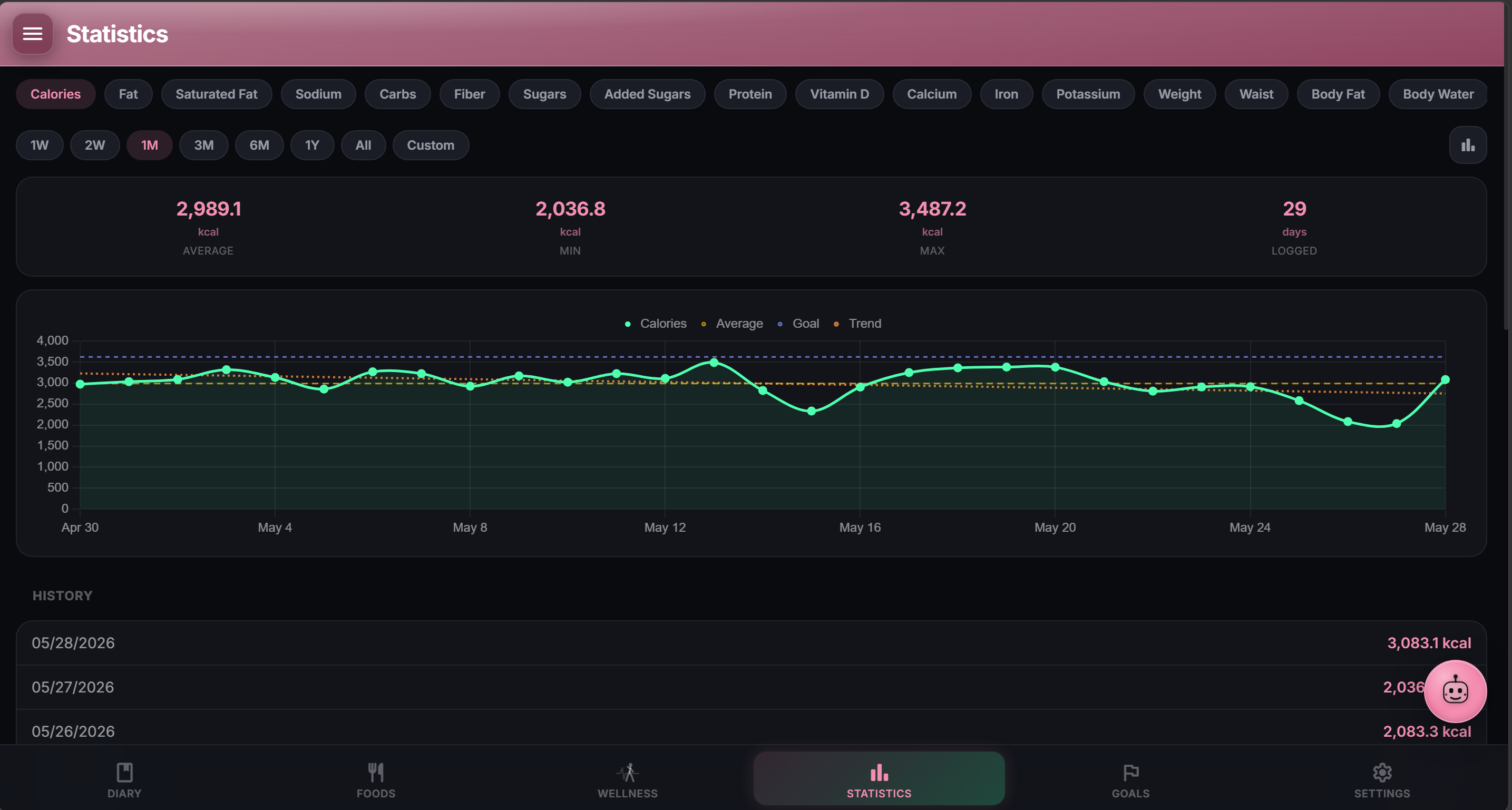
- Statistics polish pass. Left rail is searchable and scrollable, charts are clickable to drill into a specific date, timelines auto-group by month past 60 days, an empty state suggests what to log next, and CSV export is available on every chart.
Server + AI
- Opt-in trace-level request diagnostics.
LOG_LEVEL=traceadds the most verbose server level, while request bodies require the separateTRACE_REQUEST_BODIES=1switch. Pre-parser instrumentation counts observed bytes and catches aborted or oversized requests without trustingContent-Length. Post-parser tracing emits bounded, credential-redacted contents for selected routes including sync pushes. API calls carryX-Request-IDacross app and server logs, 413s emit one structured warning, static and upload traffic stays out of INFO logs, invalid logging configuration fails at startup, and the server startup line now includes its resolved NutriTrace version. Thanks to @librarian (PR #150). - Model Context Protocol (MCP) server (#103, thanks @javydekoning). (promoted from dev01 for release-notes visibility) 12 tools across three tiers, each gated by its own env flag AND its own token scope. Read tools (5) enabled with
MCP_ENABLED=1andmcp:read. Write tools (4) addMCP_WRITE_ENABLED=1andmcp:write; everything lands as normal editable diary entries. Destructive tools (3) addMCP_DESTROY_ENABLED=1,mcp:destroy, AND every call must includeconfirm: true. Tombstoned diary days refuse writes rather than silently resurrect. Every tool query is scoped onuser_id. Full setup + Claude Desktop config at docs/nutritrace/mcp/.
Fixed
- AI Assistant custom model didn’t persist (#151, thanks @pliddle). Typing a model ID into the Custom field on any provider now saves on every keystroke instead of reverting to the last preset the next time you opened Settings. NutriTrace-only bug; the same code path was already correct in LiftTrace and CookTrace.
- Android pull-to-refresh fired mid-page. Scrolling downward anywhere on a page could trigger the sync spinner because the gesture recognizer accepted any downward swipe. It now only fires at true top-of-scroll, matching Android’s standard SwipeRefreshLayout behavior.
- Whole-app remount on every navigation. The app shell was keying
<main>on the full URL, which force-remounted on every intra-app link (flashing content, losing transient state on the incoming view). Now keys on the top-level route segment so same-shell nav stays live.
Changed
- Refreshed AI model presets. Google Gemini added 3.5 Flash Lite / 3.6 Flash / 3.1 Pro to the top of the dropdown; OpenAI added GPT-5.6 Luna / Terra / full. Previous-generation entries (Gemini 2.5, GPT-4o, Claude Opus 4.8) remain in the dropdown labeled “(previous)” and continue to work unchanged. Defaults for new installs bumped to Gemini 3.6 Flash and GPT-5.6 Luna.
Infrastructure
- i18n CI check ported from LiftTrace. GitHub Actions now enforces no-duplicate keys across ARB files, and every code-referenced translation key must resolve.
- Docs: roadmap updated to reflect the current API token scope set (adds
write:workoutsandmcp:*).