Wardrowbe
Self-hosted wardrobe management with AI-powered outfit recommendations
Alternative to: whering, cladwell, stylebook
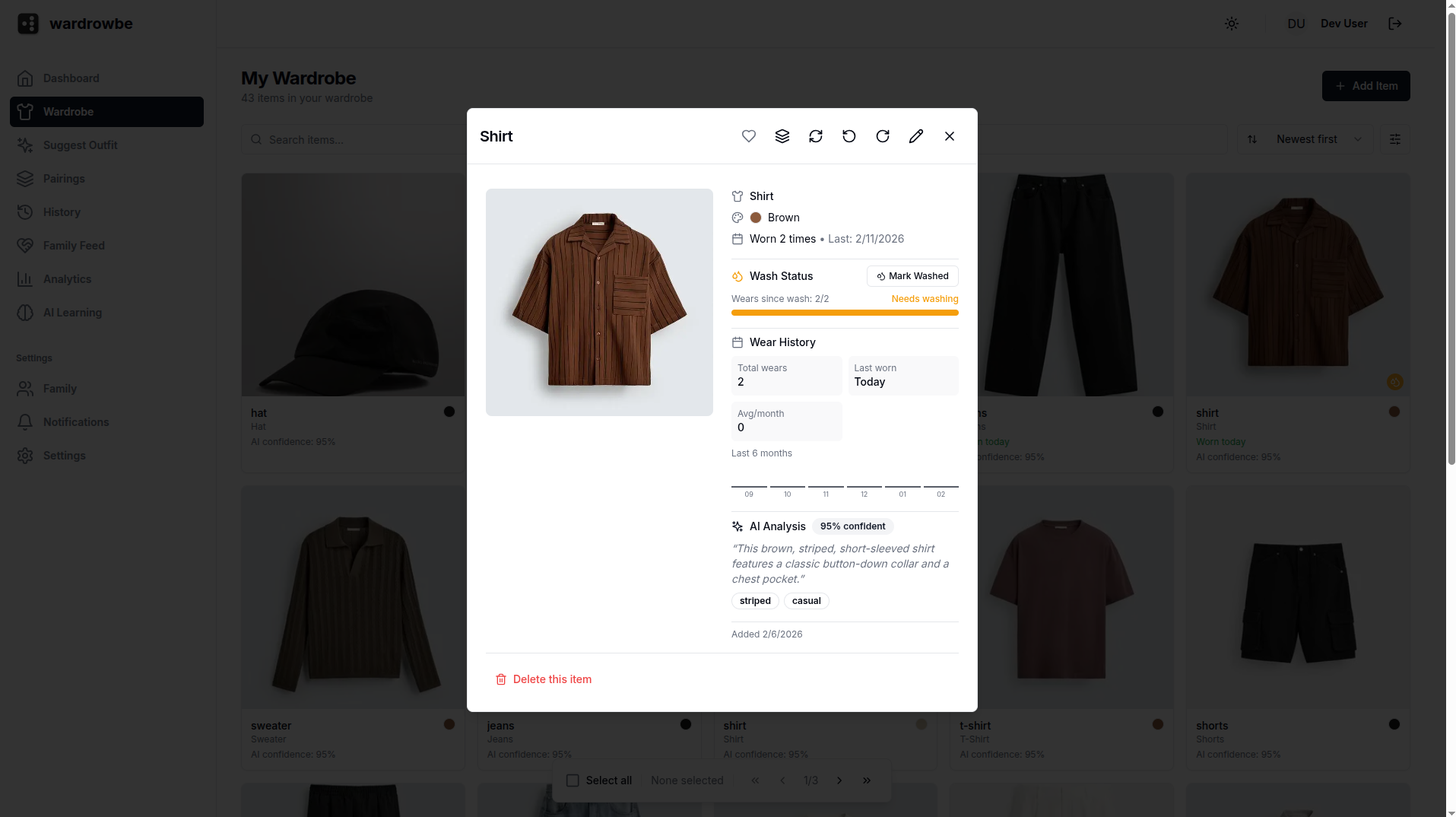
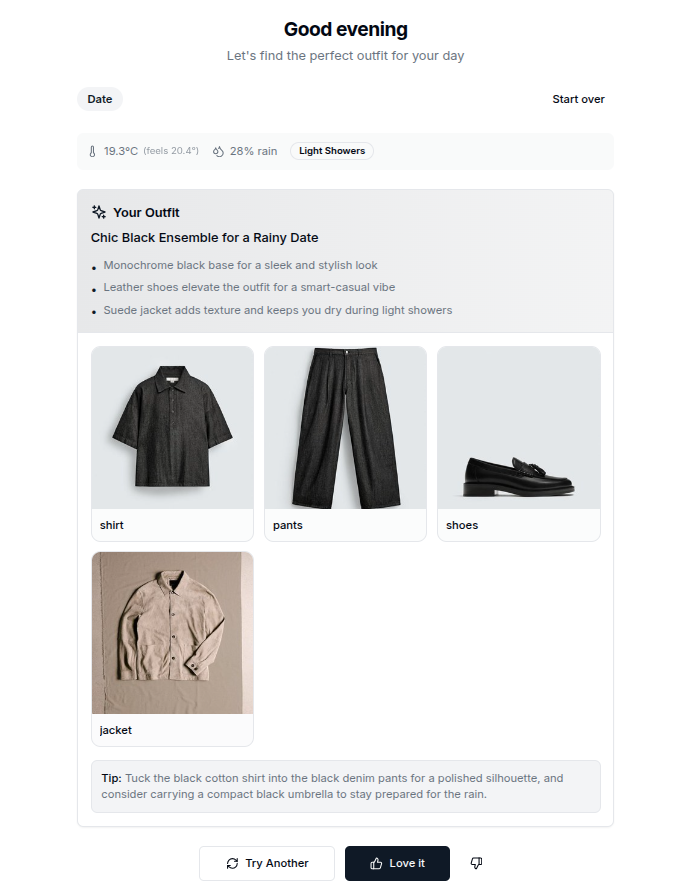
Wardrowbe lets you photograph your clothes and uses AI to automatically tag colors, patterns, and styles, then suggests daily outfits based on weather and occasion. It tracks wear history, wash status, and analytics, and supports multiple household members. AI tagging can run against OpenAI, Ollama, LocalAI, or be disabled entirely for a fully offline setup.
Wardrowbe Docker Compose example
Self-host Wardrowbe on your own server, homelab, or VPS starting from this Docker Compose example.
It runs Wardrowbe in Docker containers using the official postgres:15-alpine, redis:7-alpine, ghcr.io/anyesh/wardrowbe:backend-latest, ghcr.io/anyesh/wardrowbe:frontend-latest, ghcr.io/anyesh/wardrowbe:backend-latest images, with persistent volumes and automatic restarts preconfigured.
Review the environment variables and adjust them to your setup, save the file as compose.yml (or docker-compose.yml), and start the stack with docker compose up -d.
services:
  postgres:
    image: postgres:15-alpine
    restart: unless-stopped
    environment:
      # Internal database user (Postgres is only reachable inside the compose network).
      POSTGRES_USER: "wardrobe"
      # Internal database password.
      POSTGRES_PASSWORD: "wardrobe"
      # Name of the application database.
      POSTGRES_DB: "wardrobe"
    volumes:
      - postgres_data:/var/lib/postgresql/data
    healthcheck:
      test: ["CMD-SHELL", "pg_isready -U wardrobe"]
      interval: 10s
      timeout: 5s
      retries: 5

  redis:
    image: redis:7-alpine
    restart: unless-stopped
    volumes:
      - redis_data:/data
    healthcheck:
      test: ["CMD", "redis-cli", "ping"]
      interval: 10s
      timeout: 5s
      retries: 5

  backend:
    image: ghcr.io/anyesh/wardrowbe:backend-latest
    restart: unless-stopped
    extra_hosts:
      - "host.docker.internal:host-gateway"
    environment:
      # Enable verbose debug logging.
      DEBUG: "false"
      # User/group id the container process drops to (match your host user to align file ownership).
      PUID: "1000"
      PGID: "1000"
      # Async Postgres connection string used by the backend.
      DATABASE_URL: "postgresql+asyncpg://wardrobe:wardrobe@postgres:5432/wardrobe"
      # Redis connection used for the background job queue.
      REDIS_URL: "redis://redis:6379/0"
      # Secret key used to sign application tokens. Generate a long random value.
      SECRET_KEY: "changeme"
      # JSON array of browser origins allowed to call the API.
      CORS_ORIGINS: '["http://localhost:3000", "http://frontend:3000"]'
      # In-container path where uploaded wardrobe images are stored.
      STORAGE_PATH: "/data/wardrobe"
      # OIDC single sign-on issuer URL (optional; leave empty to use built-in auth only).
      OIDC_ISSUER_URL: ""
      # OIDC client id (optional).
      OIDC_CLIENT_ID: ""
      # OIDC client secret (optional).
      OIDC_CLIENT_SECRET: ""
      # Trust a reverse-proxy authentication header for SSO (only enable behind a trusted proxy).
      AUTH_TRUST_HEADER: "false"
      # OpenAI-compatible endpoint for AI clothing tagging (defaults to a local Ollama on the host).
      AI_BASE_URL: "http://host.docker.internal:11434/v1"
      # Vision model used to analyse clothing images.
      AI_VISION_MODEL: "gpt-4o"
      # Text model used to generate tags and descriptions.
      AI_TEXT_MODEL: "gpt-4o"
      # AI request timeout in seconds.
      AI_TIMEOUT: "120"
      # Number of retries for failed AI requests.
      AI_MAX_RETRIES: "3"
      # Master switch for the built-in AI integration.
      AI_INTERNAL_ENABLED: "true"
      # Enable AI vision tagging (leave empty to keep it off).
      AI_VISION_ENABLED: ""
      # Enable AI text tagging (leave empty to keep it off).
      AI_TEXT_ENABLED: ""
      # ntfy push-notification server URL (optional).
      NTFY_SERVER: ""
      # ntfy access token (optional).
      NTFY_TOKEN: ""
      # Mattermost incoming-webhook URL for notifications (optional).
      MATTERMOST_WEBHOOK_URL: ""
    volumes:
      - wardrobe_data:/data/wardrobe
    depends_on:
      postgres:
        condition: service_healthy
      redis:
        condition: service_healthy
    healthcheck:
      test: ["CMD", "curl", "-f", "http://localhost:8000/api/v1/health"]
      interval: 30s
      timeout: 10s
      retries: 3

  frontend:
    image: ghcr.io/anyesh/wardrowbe:frontend-latest
    restart: unless-stopped
    environment:
      # Internal URL the Next.js server uses to reach the backend API.
      BACKEND_URL: "http://backend:8000"
      # Public URL where users access wardrObe (used by NextAuth for callbacks).
      NEXTAUTH_URL: "http://localhost:3000"
      # Secret used by NextAuth to encrypt sessions. Generate a long random value.
      NEXTAUTH_SECRET: "changeme"
      # Enable frontend development mode.
      DEV_MODE: "false"
      # User/group id the container process drops to.
      PUID: "1001"
      PGID: "1001"
    depends_on:
      - backend

  worker:
    image: ghcr.io/anyesh/wardrowbe:backend-latest
    restart: unless-stopped
    command: arq app.workers.worker.WorkerSettings
    extra_hosts:
      - "host.docker.internal:host-gateway"
    environment:
      # User/group id the container process drops to.
      PUID: "1000"
      PGID: "1000"
      # Async Postgres connection string used by the worker.
      DATABASE_URL: "postgresql+asyncpg://wardrobe:wardrobe@postgres:5432/wardrobe"
      # Redis connection used for the background job queue.
      REDIS_URL: "redis://redis:6379/0"
      # OpenAI-compatible endpoint for AI clothing tagging.
      AI_BASE_URL: "http://host.docker.internal:11434/v1"
      # Vision model used to analyse clothing images.
      AI_VISION_MODEL: "gpt-4o"
      # Text model used to generate tags and descriptions.
      AI_TEXT_MODEL: "gpt-4o"
      # AI request timeout in seconds.
      AI_TIMEOUT: "120"
      # Number of retries for failed AI requests.
      AI_MAX_RETRIES: "3"
      # Number of AI tagging jobs processed concurrently.
      AI_TAGGING_CONCURRENCY: "5"
      # Master switch for the built-in AI integration.
      AI_INTERNAL_ENABLED: "true"
      # Enable AI vision tagging (leave empty to keep it off).
      AI_VISION_ENABLED: ""
      # Enable AI text tagging (leave empty to keep it off).
      AI_TEXT_ENABLED: ""
      # In-container path where uploaded wardrobe images are stored.
      STORAGE_PATH: "/data/wardrobe"
    volumes:
      - wardrobe_data:/data/wardrobe
    depends_on:
      postgres:
        condition: service_healthy
      redis:
        condition: service_healthy

volumes:
  postgres_data:
  redis_data:
  wardrobe_data:
Values set to changeme are required — replace them with your own
values before starting Wardrowbe.
Prefer a managed setup? WinterFlow installs, configures, and updates Wardrowbe for you using this same Docker Compose configuration.