
rotki
Privacy-focused, self-hosted crypto and financial portfolio tracker with accounting and tax reports
Alternative to: cointracker, koinly, coinstats, delta investment tracker
v1.23.0
2021-12-31Description
Rotki v1.23.0 is one of our biggest feature release containing lots of new features, improvements and bug fixes we made in the last month! It contains a whooping 286 commits by 7 different contributors!
There is too many things to consider in this release but some of the highlights are:
- Support for kraken mobile app trades
- Considerable performance increase for big number of historical entries
- Support Saddle Finance and Paraswap airdrop
- Support tracking of ETH2 validator by index or pubkey and specifying ownership percentage
- Bisq history import via CSV
- Save PnL reports and reload them from disk
- NFT Icons now appear at balances and dashboard
For more information check the detailed changelog below :point_down:
Downloads
Upgrade is highly recommended. Download the binary for your OS from below:
- Linux
- OSX
- Windows
Optionally, you can also verify the integrity of the aforementioned binaries using the following checksums:
- Linux
- OSX
- Windows
Potential action required
Ignored ethereum transactions
If you had any ethereum transactions that were ignored for accounting they will now need to be ignored again.
Release Highlights
Kraken mobile app trades
Users who have done trades in kraken’s mobile app will now be able to see them and have them tracked in rotki.

Performance increase for big number of historical entries
In the past rotki was having a very big difficulty with a big number of historical events. This is no longer the case thanks to a considerable rework of the api and pagination mechanism. No matter the amount of events, rotki should now function fine and pages will load fast. What’s more the memory footpring of the app is going to be a lot better now.
Saddle Finance and Paraswap airdrop
Two new airdrops, that of Saddle Finance and Paraswap are now supported. If any of the user’s tracked addresses are eligible, they will be able to see it in the airdrops section.

Support tracking of ETH2 validator by index or pubkey and specifying ownership percentage
ETH2 validators can now be tracked manually by adding them as a new blockchain (beacon chain) account. They can be added either via index or public key. What’s more since some people share ownership of validators you can specify ownership as a percentage and all balances and historical stats will respect that percentage for the given validator.

Bisq history import
Data from Bisq exchange can now be imported via a CSV

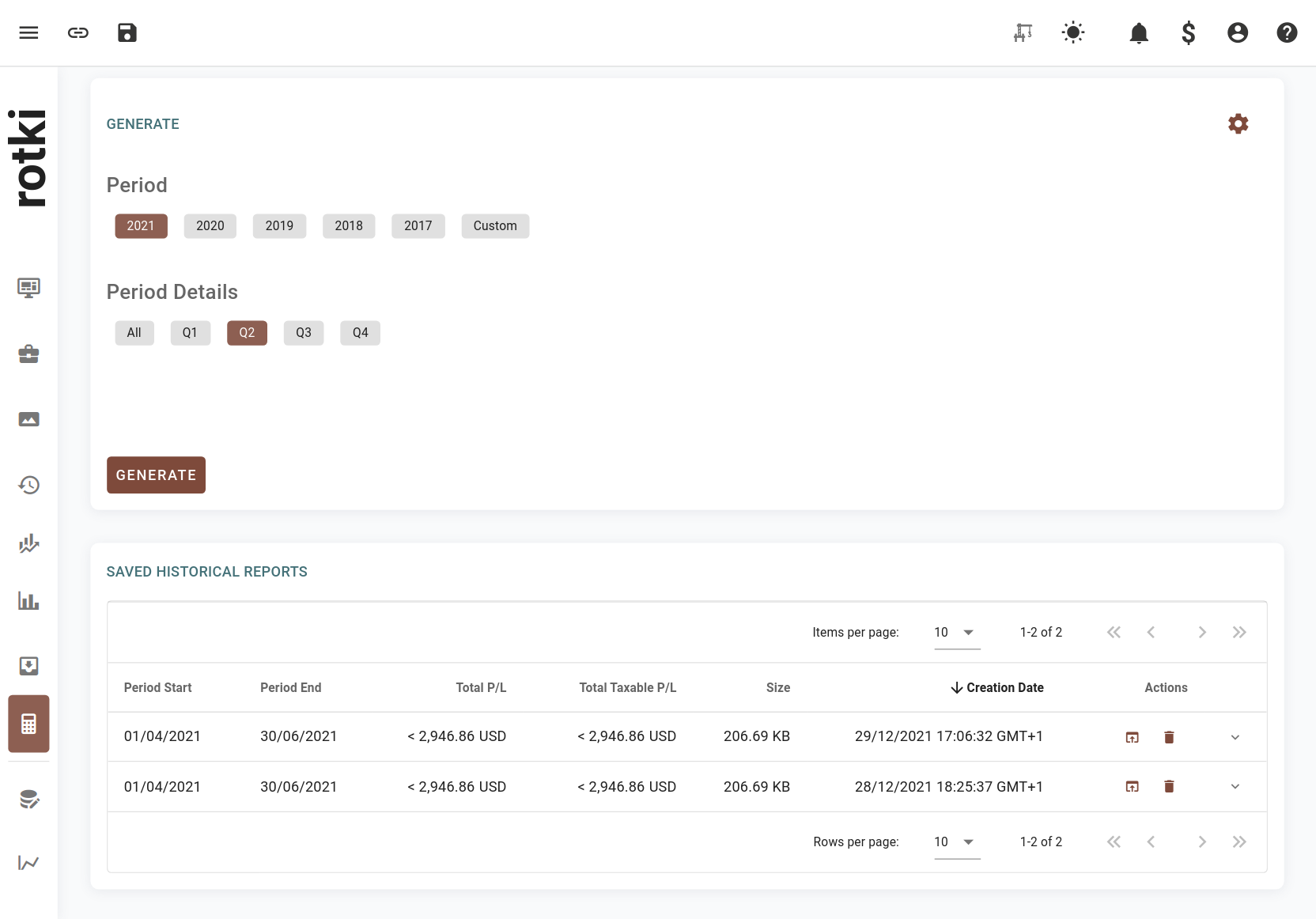
Save PnL reports and reload them from disk
PnL reports are now saved to disk. Users can reload any previously ran PnL report from disk and check its events and results. A limitation here is that CSV export only exists for the latest PnL report ran in the current session.
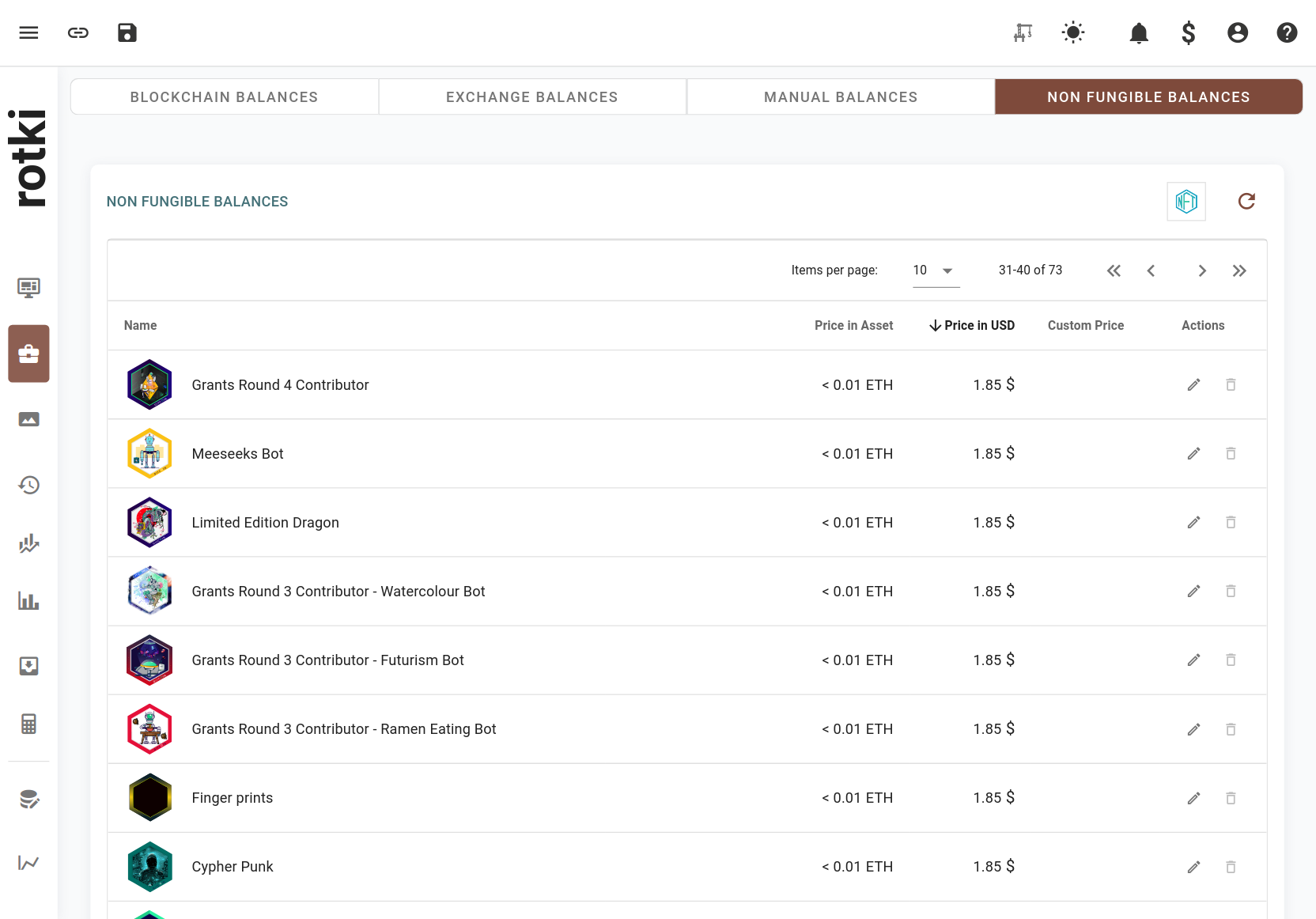
NFT Icons now appear at balances and dashboard
Users will now see the images for their NFTs also in the dashboard’s balances instead of only in the NFT gallery view.

These were the highlights. Check below for the full changelog :point_down:
New Features
- #3324 Users will be able to set the percentage of ownership for jointly held eth2 validators.
- #3425 Users will be able to enter multiple pairs at once for binance exchange settings.
- #3842 Users will now be taken directly to create account when downloading the application for the first time.
- Any ethereum transactions that were ignored for accounting will now need to be re-ignored.
- #1242 Users will be asked first whether to activate premium feature, and enable database sync when create new account.
- #2876 The application users will now be able to start the auto update mechanism manually from the update indicator.
- #2386 Users will see a separate section of L2 balances in Blockchain Balances section.
- #2382 Users will now be able to filter specific accounts such as the ones from Loopring using an automatically added tag.
- #2901 Users will now be able to select between a full privacy mode and a semi-privacy mode that keeps the percentages visible.
- #2624 Users will now be able to filter by tag in the asset details page.
- #2265 Users will now be able to see a hint for the trade rate when adding an external trade.
- #2848 Users will now get taken to the top of the table automatically when changing a page.
- #2121 Users can now select a different timezone when selecting a date to input.
- #1875 Users can now enable or disable specific time frames in the graph timeframe.
- #2446 Users can now switch between adding an external trade using quote asset amount or trade rate.
- #2297 The application will now perform an update check every 24h (user-configurable) while the application is running.
- #3470 Users can now customize the date input format.
- #2918 Users can now select how the percentage column is calculated in the dashboard. Either based on total net value or based on current group (assets, liabilities, or nft).
- #3753 Application users will now be able to (copy, cut and paste) using the context menu .
- #3525 Users can now see the NFT icon at the NFT Balance table, and Non Fungible Balance table.
- #3176 Amount inputs will now adhere to the user specified amount formatting.
- #1214 Users will now be able to load and manage previously generated profit and loss reports.
- #3716 Users can now see if any of their addresses have PSP available to claim from the PSP airdrop.
- #824 Users will now be able to import their trade history from bisq.
- #1864 Users will now be able to see trades, deposits and withdrawals imported in CSV from exchanges not connected using API keys.
- #3685 Users will now be able to correctly read more transaction types in CSV files imported from crypto.com.
- #3497 Users will now be able to add ETH2 validators via index or public key.
- #3725 Users can now see if any of their addresses have SDL available to claim from the SDL airdrop.
- #3708 Users will now be able to see trades from kraken made from their phone APP and in the kraken’s swap UI.
- #3549 Users will now be able to select whether to include or not NFT total value in total net worth and graphs.
- #3712 Users will now be able to choose a custom date format while importing CSV files.
Bug Fixes
- #3847 Remove whitespace when inputting address in new asset form.
- #3767 The module selector will now properly clear after selecting a module by clicking.
- #3128 Bigger net worth values on dashboard should not overlap with the net worth graph.
- #3641 Users should now be able to view profit and loss reports that have many thousands of events without the UI freezing.
- Deposits and withdrawals in files from cointracking will now be correctly registered.
- ShapeShift CSV includes minerFee in rate, but outputAmount does not include minerFee. Fix to account for the true transacted base amount.
- Bitfinex users that used Spankchain in the exchange will now be able to see it properly in their trades, deposits/withdrawals and balances.
- Users connected to Alchemy as a node will be able to properly retrieve old ethereum transactions.
- Users whose only interaction with a yearn vault was a deposit will no longer see the entire deposit as loss in the PnL.
- #3804 Bitpanda users should now be able to see their crypto deposits and withdrawals.
- #3847 Inputting an address in the asset form with extra whitespace will now work properly thanks to trimming.
- #3859 Trades imported from crypto.com CSV should now have the correct rate imported.
Newly supported assets
Added support for the following assets:
- ParaSwap (PSP)
- Saddle DAO (SDL)
- Bisq DAO Token (BSQ)
- BitBase (BTBS)
- Crypto Perx (CPRX)
- ONSTON (ONSTON)
- POLKER (PKR)
- 28VCK (28VCK)
- Boba Token (BOBA)
- Saitama Inu (SAITAMA)
- Calamari Network (KMA)
- Infinite Launch (ILA)
- Monsta Infinite Token (MONI)
- EarthFund (1EARTH)
- Burn (ASH)
- PolyDoge (POLYDOGE)
- Codex (CDEX)
- RealFevr (FEVR)
- HTMLCOIN (HTML)
- Smaugs NFT (SMG)
- KILT Protocol (KILT)
- FC Porto Fan Token (PORTO)
- FC Santos Fan Token (SANTOS)
- Zipmex Token (ZMT)
- DeversiFi Token (DVF)
- Apex protocol token (APXP)
- ARIVA (ARV)
- ETHA (ETHA)
- GreenCoin (GRNC)
- Luxurious Pro Network Token (LPNT)
- Moss Carbon Credit (MCO2)
- Ribbon (RBN)
- Wrapped TON Coin (TONCOIN)
- Pintu Token (PTU)
- JoeToken (JOE)
- Euro Tether (EURT)
- Rocket Pool ETH (rETH)
- Gearbox (GEAR)
- Agora (AGR)
- Osmosis (OSMO)
- Immutable X (IMX)
- Iron Bank AUD (ibAUD)
- Iron Bank CHF (ibCHF)
- Iron Bank GBP (ibGBP)
- Iron Bank JPY (ibJPY)
- Iron Bank EUR (ibEUR)
- Iron Bank KRW (ibKRW)
- Curve.fi Factory Plain Pool: ibCHF/sCHF (ibCHF+sCHF-f)
- Curve.fi Factory Plain Pool: ibGBP/sGBP (ibGBP+sGBP-f)
- Curve.fi Factory Plain Pool: MIM-UST (MIM-UST-f)
- Curve.fi Factory Plain Pool: ibKRW/sKRW (ibKRW+sKRW-f)
- Curve.fi Factory Plain Pool: Neutrino EUR (EURN/EURT-f)
- Curve.fi Factory Plain Pool: cvxCRV (cvxcrv-f)
- Curve.fi Factory Plain Pool: d3pool (D3-f)
- Curve.fi Factory Pool: alETH (alETH+ETH-f)
- Curve.fi Factory USD Metapool: Origin Dollar (OUSD3CRV-f)
- Curve EURT-3Crv (crvEURTUSD)
- Curve.fi Factory Plain Pool: ibAUD/sAUD (ibAUD+sAUD-f)
- Curve.fi Factory Plain Pool: ibJPY/sJPY (ibJPY+sJPY-f)
- Curve.fi Factory USD Metapool: USDM (USDM3CRV-f)
- Curve.fi Factory BTC Metapool: ibBTC (ibbtc/sbtcCRV-f)
- Curve.fi Factory USD Metapool: Magic Internet Mone… (MIM-3LP3CRV-f)
- Curve.fi Factory Plain Pool: ibEUR/sEUR (ibEUR+sEUR-f)
- Curve EURS-USDC (crvEURSUSDC)
- USDC yVault (yvUSDC)
- YFI yVault (yvYFI)
- Curve TUSD Pool yVault (yvCurve-TUSD)
- Curve Pax Pool yVault (yvCurve-Pax)
- Curve USDT Pool yVault (yvCurve-USDT)
- Curve USDK Pool yVault (yvCurve-USDK)
- Curve 3Crypto Pool yVault (yvCurve-3Crypto)
- Curve EURT Pool yVault (yvCurve-EURT)
- Curve MIM Pool yVault (yvCurve-MIM)
- Curve cvxCRV Pool yVault (yvCurve-cvxCRV)
- Curve ibEUR Pool yVault (yvCurve-ibEUR)
- Curve ibKRW Pool yVault (yvCurve-ibKRW)
- Curve ibGBP Pool yVault (yvCurve-ibGBP)
- Curve ibAUD Pool yVault (yvCurve-ibAUD)
- Curve ibCHF Pool yVault (yvCurve-ibCHF)
- Curve ibJPY Pool yVault (yvCurve-ibJPY)
- Curve USDM Pool yVault (yvCurve-USDM)
- Curve alETH Pool yVault (yvCurve-alETH)
- Curve EURN Pool yVault (yvCurve-EURN)
- Curve MIM-UST Pool yVault (yvCurve-MIMUST)
- Curve OUSD Pool yVault (yvCurve-OUSD)
- Curve ibBTC Pool yVault (yvCurve-ibBTC)
- Curve d3pool Pool yVault (yvCurve-d3pool)
- Curve EURT-USD Pool yVault (yvCurve-EURTUSD)
- Curve EURS-USDC Pool yVault (yvCurve-EURSUSDC)
- LUSD yVault (yvLUSD)
- Biconomy Token (BICO)
- Highstreet token (HIGH)
- Merit Circle (MC)
- Ooki Token (OOKI)
- ConstitutionDAO (PEOPLE)
- CosplayToken (COT)
- Metafinance (MF)
- PointPay Crypto Banking Token V2 (PXP)
- XDEFI (XDEFI)
- Unlock Discount Token (UDT)
- Juicebox (JBX)
- Mochi Inu (MOCHI)
- ANGLE (ANGLE)
- fren (FREN)
- VOXEL Token (VOXEL)
- Decentralized Social (DESO)
- DeFi Land (DFL)
- MonkeyBall (MBS)
- Genopets (GENE)
- Prism (PRISM)
- WonderFi Tokenized Stock (WNDR)
- Guild of Guardians (GOG)
- PolkaBridge (PBR)
- NUM Token (NUM)
- UNIC (UNIC)
- Epik Prime (EPIK)
- Gold Fever Native Gold (NGL)
- ARKER (ARKER)
- Lovelace (LACE)
- Unbound (UNB)
- GameFi (GAFI)
- Kollect (KOL)
- Chumbi Valley (CHMB)
- FalconSwaps Token (FALCONS)
- Orbit Chain (ORC)
- Alkimi Exchange ($ADS)
- SOS (SOS)
- THE TRUTH (UFO)
- VLaunch (VPAD)
- O3 Swap Token (O3)
- MiraQle (MQL)
- xHashtag (XTAG)
- MINE Network (MNET)
- Humans.ai (HEART)
- Forward (FORWARD)
- RaceFi (RACEFI)
- Bitcicoin (BITCI)
- GuildFi Token (GF)
- GM (GM)
- GN (GN)
- Godzilla (GODZ)
- Maple Token (MPL)
- Fingerprints (PRINTS)
- Surviving Soldiers (SSG)
- Vader (VADER)
- Songbird (SGB)
- Kyrrex (KRRX)
- TRVL (TRVL)
- Victoria VR (VR)
- Credefi (CREDI)
- Propel Token (PEL)
- H3RO3S (H3RO3S)
- Vybit (VI)
- Giveth (GIV)
- AtariToken (ATRI)
- Hot Cross Token (HOTCROSS)
- Niftify (NIFT)
- AnchorUST (AUST)
Updated the information of the following assets: