
Habitat
Self-hosted, ad-free platform for local community discussions
Alternative to: nextdoor, front porch forum
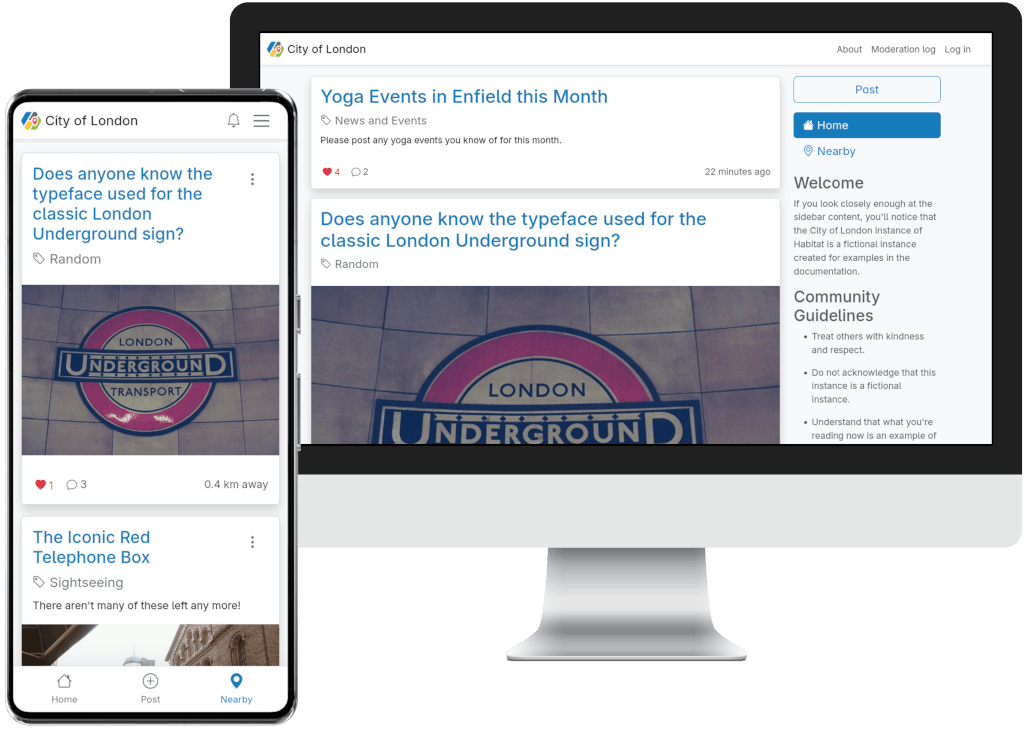
Habitat is a self-hosted platform for local communities to discuss neighborhood topics and discover what's happening nearby, built around location-based posts and a map view. It is free of ads and data harvesting, and each instance is owned and moderated by its own community rather than a corporation. Independent Habitat instances can federate to let residents discover conversations across neighboring areas.
Habitat Docker Compose example
Self-host Habitat on your own server, homelab, or VPS starting from this Docker Compose example.
It runs Habitat in Docker containers using the official carlnewton/habitat:latest, carlnewton/habitat:latest, postgres:16-alpine images, with persistent volumes and automatic restarts preconfigured.
Review the environment variables and adjust them to your setup, save the file as compose.yml (or docker-compose.yml), and start the stack with docker compose up -d.
services:
  habitat-app:
    image: carlnewton/habitat:latest
    restart: unless-stopped
    environment:
      # Public URL of your Habitat instance. Behind a reverse proxy that terminates
      # TLS, keep this an http:// URL so the bundled Caddy server serves plain HTTP.
      SERVER_NAME: "http://localhost"
      # A unique 32-character string used to sign cookies and tokens.
      APP_SECRET: "changeme"
      # A unique 32-character string used to encrypt stored data. Never change it after the first setup.
      ENCRYPTION_KEY: "changeme"
      # Connection string for the PostgreSQL database (see the habitat-database service below).
      DATABASE_URL: "postgresql://habitat:changeme@habitat-database:5432/habitat?serverVersion=16&charset=utf8"
    volumes:
      - caddy_data:/data
      - caddy_config:/config
      - habitat_uploads:/uploads
    security_opt:
      - no-new-privileges:true

  habitat-worker:
    image: carlnewton/habitat:latest
    restart: unless-stopped
    environment:
      # The worker only processes background jobs; the app container owns migrations.
      RUN_MIGRATIONS: "false"
      # Public URL of your Habitat instance. Behind a reverse proxy that terminates
      # TLS, keep this an http:// URL so the bundled Caddy server serves plain HTTP.
      SERVER_NAME: "http://localhost"
      # A unique 32-character string used to sign cookies and tokens.
      APP_SECRET: "changeme"
      # A unique 32-character string used to encrypt stored data. Never change it after the first setup.
      ENCRYPTION_KEY: "changeme"
      # Connection string for the PostgreSQL database (see the habitat-database service below).
      DATABASE_URL: "postgresql://habitat:changeme@habitat-database:5432/habitat?serverVersion=16&charset=utf8"
    command: ['bin/console', 'messenger:consume', '-vv', '--time-limit=600', '--limit=10', '--memory-limit=128M']
    healthcheck:
      disable: true
    volumes:
      - habitat_uploads:/uploads
    depends_on:
      habitat-app:
        condition: service_healthy
    security_opt:
      - no-new-privileges:true

  habitat-database:
    image: postgres:16-alpine
    restart: unless-stopped
    environment:
      # Name of the PostgreSQL database.
      POSTGRES_DB: "habitat"
      # Password for the PostgreSQL user. Used only inside the compose network.
      POSTGRES_PASSWORD: "changeme"
      # Name of the PostgreSQL user.
      POSTGRES_USER: "habitat"
    healthcheck:
      test: ["CMD", "pg_isready", "-d", "habitat", "-U", "habitat"]
      timeout: 5s
      retries: 5
      start_period: 60s
    volumes:
      - database_data:/var/lib/postgresql/data:rw
    security_opt:
      - no-new-privileges:true

volumes:
  caddy_data:
  caddy_config:
  habitat_uploads:
  database_data:
Values set to changeme are required — replace them with your own
values before starting Habitat.
Prefer a managed setup? WinterFlow installs, configures, and updates Habitat for you using this same Docker Compose configuration.