
Frappe Learning
Easy to use, open source Learning Management System
Alternative to: teachable, thinkific, udemy
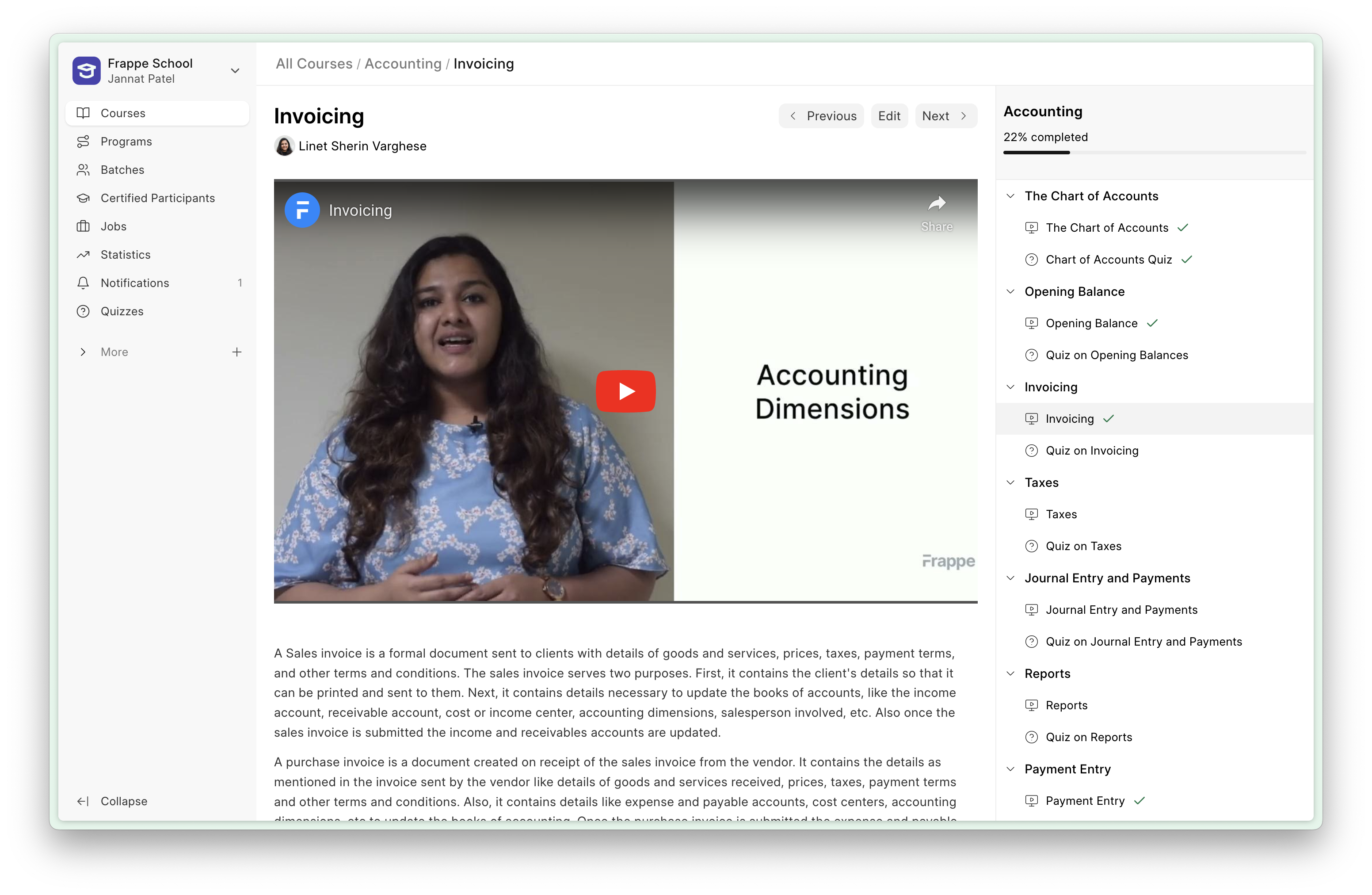
Frappe Learning is an open source Learning Management System for creating and running online courses, organized into a simple courses/chapters/lessons hierarchy. It supports live classes via Zoom integration, quizzes and assignments with multiple question types, and automatic certificate generation for learners. Built on the Frappe Framework, it can be fully self-hosted for teams that want to own their course content and learner data.
Frappe Learning Docker Compose example
Self-host Frappe Learning on your own server, homelab, or VPS starting from this Docker Compose example.
It runs Frappe Learning in Docker containers using the official ghcr.io/frappe/lms:stable, ghcr.io/frappe/lms:stable, ghcr.io/frappe/lms:stable, mariadb:11.8, ghcr.io/frappe/lms:stable, ghcr.io/frappe/lms:stable, ghcr.io/frappe/lms:stable, redis:6.2-alpine, redis:6.2-alpine, ghcr.io/frappe/lms:stable, ghcr.io/frappe/lms:stable images, with persistent volumes and automatic restarts preconfigured.
Review the environment variables and adjust them to your setup, save the file as compose.yml (or docker-compose.yml), and start the stack with docker compose up -d.
services:
  backend:
    image: ghcr.io/frappe/lms:stable
    depends_on:
      configurator:
        condition: service_completed_successfully
    volumes:
      - sites:/home/frappe/frappe-bench/sites
      - logs:/home/frappe/frappe-bench/logs
    restart: unless-stopped

  configurator:
    image: ghcr.io/frappe/lms:stable
    entrypoint:
      - bash
      - -c
    command:
      - >
        ls -1 apps > sites/apps.txt;
        bench set-config -g db_host $$DB_HOST;
        bench set-config -gp db_port $$DB_PORT;
        bench set-config -g redis_cache "redis://$$REDIS_CACHE";
        bench set-config -g redis_queue "redis://$$REDIS_QUEUE";
        bench set-config -g redis_socketio "redis://$$REDIS_QUEUE";
        bench set-config -gp socketio_port $$SOCKETIO_PORT;
    environment:
      DB_HOST: "db"
      DB_PORT: "3306"
      REDIS_CACHE: "redis-cache:6379"
      REDIS_QUEUE: "redis-queue:6379"
      SOCKETIO_PORT: "9000"
    volumes:
      - sites:/home/frappe/frappe-bench/sites
      - logs:/home/frappe/frappe-bench/logs

  create-site:
    image: ghcr.io/frappe/lms:stable
    entrypoint:
      - bash
      - -c
    command:
      - >
        wait-for-it -t 120 db:3306;
        wait-for-it -t 120 redis-cache:6379;
        wait-for-it -t 120 redis-queue:6379;
        export start=`date +%s`;
        until [[ -n `grep -hs ^ sites/common_site_config.json | jq -r ".db_host // empty"` ]] && \
          [[ -n `grep -hs ^ sites/common_site_config.json | jq -r ".redis_cache // empty"` ]] && \
          [[ -n `grep -hs ^ sites/common_site_config.json | jq -r ".redis_queue // empty"` ]];
        do
          echo "Waiting for sites/common_site_config.json to be created";
          sleep 5;
          if (( `date +%s`-start > 120 )); then
            echo "could not find sites/common_site_config.json with required keys";
            exit 1
          fi
        done;
        echo "sites/common_site_config.json found";
        if [ -d "sites/frontend" ]; then
          echo "Site frontend already exists, skipping creation";
        else
          bench new-site --mariadb-user-host-login-scope='%' --admin-password="$$ADMIN_PASSWORD" --db-root-username=root --db-root-password=admin --install-app lms --set-default frontend;
        fi;
    environment:
      # Password of the "Administrator" account, set once when the site is first created.
      ADMIN_PASSWORD: "changeme"
    volumes:
      - sites:/home/frappe/frappe-bench/sites
      - logs:/home/frappe/frappe-bench/logs

  db:
    image: mariadb:11.8
    healthcheck:
      test: ["CMD", "healthcheck.sh", "--connect", "--innodb_initialized"]
      start_period: 5s
      interval: 5s
      timeout: 5s
      retries: 5
    command:
      - --character-set-server=utf8mb4
      - --collation-server=utf8mb4_unicode_ci
      - --skip-character-set-client-handshake
    environment:
      # MariaDB root password. Used only inside the compose network.
      MARIADB_ROOT_PASSWORD: "admin"
    volumes:
      - db-data:/var/lib/mysql
    restart: unless-stopped

  frontend:
    image: ghcr.io/frappe/lms:stable
    depends_on:
      - websocket
      - backend
    command:
      - nginx-entrypoint.sh
    environment:
      BACKEND: "backend:8000"
      # Site served for every request regardless of the Host header.
      FRAPPE_SITE_NAME_HEADER: "frontend"
      SOCKETIO: "websocket:9000"
      # Trusted proxy address whose X-Forwarded-For header is used as the client IP.
      UPSTREAM_REAL_IP_ADDRESS: "127.0.0.1"
      UPSTREAM_REAL_IP_HEADER: "X-Forwarded-For"
      UPSTREAM_REAL_IP_RECURSIVE: "off"
      # Seconds nginx waits for a backend response.
      PROXY_READ_TIMEOUT: "120"
      # Maximum upload size.
      CLIENT_MAX_BODY_SIZE: "50m"
    volumes:
      - sites:/home/frappe/frappe-bench/sites
      - logs:/home/frappe/frappe-bench/logs
    restart: unless-stopped

  queue-long:
    image: ghcr.io/frappe/lms:stable
    depends_on:
      configurator:
        condition: service_completed_successfully
    command:
      - bench
      - worker
      - --queue
      - long,default,short
    environment:
      FRAPPE_REDIS_CACHE: "redis://redis-cache:6379"
      FRAPPE_REDIS_QUEUE: "redis://redis-queue:6379"
    volumes:
      - sites:/home/frappe/frappe-bench/sites
      - logs:/home/frappe/frappe-bench/logs
    restart: unless-stopped

  queue-short:
    image: ghcr.io/frappe/lms:stable
    depends_on:
      configurator:
        condition: service_completed_successfully
    command:
      - bench
      - worker
      - --queue
      - short,default
    environment:
      FRAPPE_REDIS_CACHE: "redis://redis-cache:6379"
      FRAPPE_REDIS_QUEUE: "redis://redis-queue:6379"
    volumes:
      - sites:/home/frappe/frappe-bench/sites
      - logs:/home/frappe/frappe-bench/logs
    restart: unless-stopped

  redis-queue:
    image: redis:6.2-alpine
    volumes:
      - redis-queue-data:/data
    restart: unless-stopped

  redis-cache:
    image: redis:6.2-alpine
    restart: unless-stopped

  scheduler:
    image: ghcr.io/frappe/lms:stable
    depends_on:
      configurator:
        condition: service_completed_successfully
    command:
      - bench
      - schedule
    volumes:
      - sites:/home/frappe/frappe-bench/sites
      - logs:/home/frappe/frappe-bench/logs
    restart: unless-stopped

  websocket:
    image: ghcr.io/frappe/lms:stable
    depends_on:
      configurator:
        condition: service_completed_successfully
    command:
      - node
      - /home/frappe/frappe-bench/apps/frappe/socketio.js
    environment:
      FRAPPE_REDIS_CACHE: "redis://redis-cache:6379"
      FRAPPE_REDIS_QUEUE: "redis://redis-queue:6379"
    volumes:
      - sites:/home/frappe/frappe-bench/sites
      - logs:/home/frappe/frappe-bench/logs
    restart: unless-stopped

volumes:
  db-data:
  redis-queue-data:
  sites:
  logs:
Values set to changeme are required — replace them with your own
values before starting Frappe Learning.
Prefer a managed setup? WinterFlow installs, configures, and updates Frappe Learning for you using this same Docker Compose configuration.