
Econumo
A budgeting app for personal, couple and family finances
Alternative to: ynab, mint, monarch money, quicken
v1.6.0
2026-10-11📖 Read the full release notes, with screenshots →
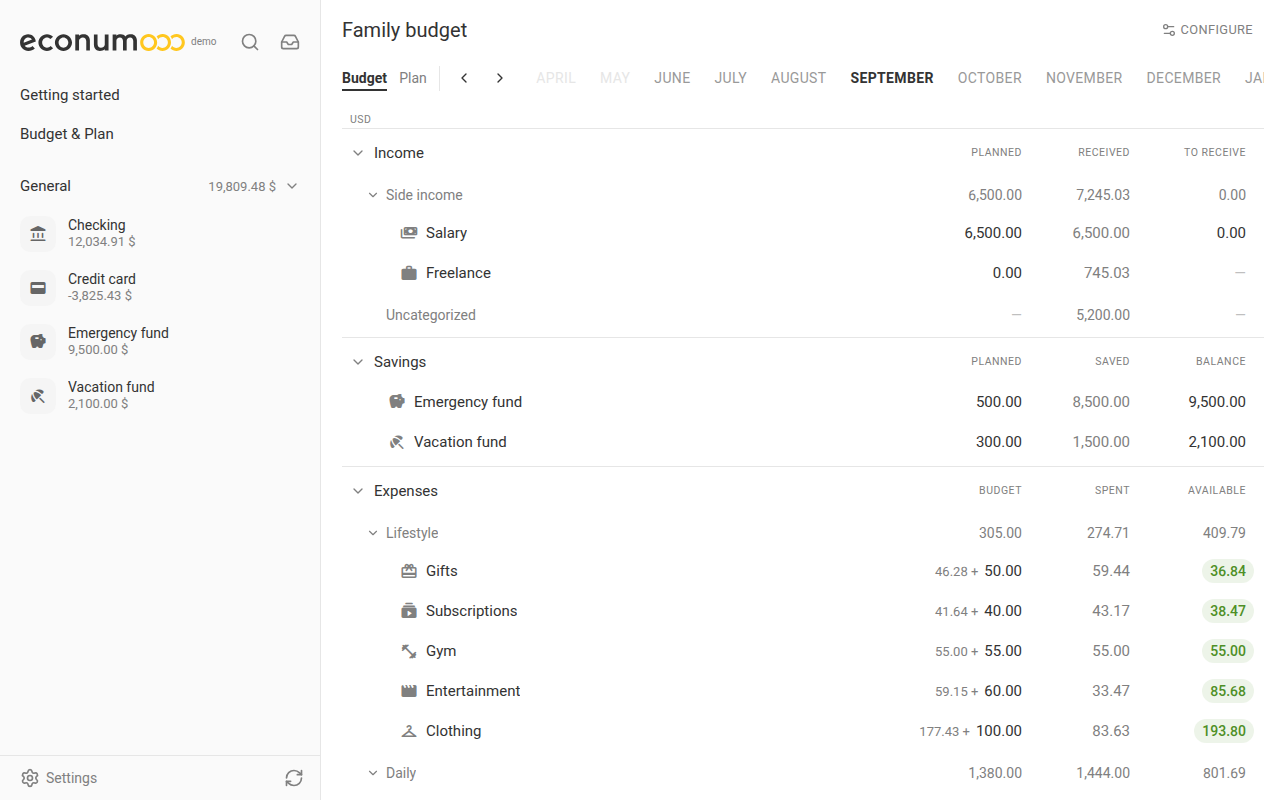
v1.6.0 redesigns the budget. The Budget and Plan views now share one structure on every screen size: a single-month view on phones, everything editable in place on desktop and tablet, and a Plan grid that works like a spreadsheet. Budgets can now carry savings accounts with planned savings and month-end balances, and any budget cell can hold a comment thread. Two new ways to get around arrive with it: global search on Ctrl/⌘+K, and an Inbox that collects everything waiting on you. Claude and Codex can also now connect to Econumo by URL alone and sign in through the browser, with no token to paste.
What’s new
- Connect Claude and Codex by URL (#307): add
<your Econumo URL>/mcpas a connector in Claude (web, desktop or mobile), Claude Code or Codex. The client opens Econumo in your browser, you sign in and press Allow, and its tools work with your data. You don’t create a personal access token or copy anything. Approved apps are listed under Settings → Personal settings → Connected apps, and you can disconnect any of them there. Under the hood this is OAuth 2.1 following the MCP authorization spec (PKCE, dynamic client registration, rotating refresh tokens), so any compliant MCP client can connect the same way. Setup guide:docs/mcp-setup.md. - Global search (#305): press Ctrl+K / ⌘K, or the Search button in the sidebar, to search accounts, categories, payees, tags, labels and transactions in one place. Before you type it lists your most recent transactions. Matching tolerates missing letters (“grcries” finds Groceries) and finds amounts as stored or as displayed. Picking a category, payee or tag lists its transactions, and every result has its own actions (edit, archive, merge, delete). Every picker you can type into now uses the same ranked matcher, including category, payee, account and currency pickers.
- Inbox (#295, #324): one page for everything waiting on you, with a count badge on the sidebar’s Inbox button. Recurring transactions due today or overdue come first, and you can post or skip them right there. Sharing invites are at the bottom, with Accept and Decline. With nothing pending, the page reads “All caught up”. This replaces the old “Sharing requests” sidebar item and dialog.
- Redesigned Budget view on desktop and tablet (#308, #312, #313): the same order as on the phone, with Income (Planned · Received · To receive), Savings and Expenses (Budget · Spent · Available). The totals sit underneath, ending with the balance at month end. You edit the structure in place:
- On desktop, hover menus let you create, edit, archive, merge and move items and folders, and you can drag rows and folders to reorder them.
- On a tablet, Configure → Edit structure turns on the same menus.
- An action you can’t take is greyed out and says why, for example “(no access)” or “(not empty)”.
- Available shows as a green or red pill again.
- Income envelopes can be created again, so Income and Expenses work the same way.
- Spreadsheet-style Plan view (#318, #327, #326): one row per item and one column per month. You edit the plan in the cell, and the keyboard and mouse work as in a spreadsheet: arrows, typing, F2, Delete, paste and fill. Each cell shows the actual next to the plan, and clicking the actual lists that month’s transactions. You can resize the name column, and section and folder sums appear when you ask for them. On desktop, select several cells (drag, Shift+click or Ctrl/⌘+click) to see their Plan and Actual sums.
- Budget on phones (#297, #299, #304, #306, #309, #302, #301): a single-month view with Budget and Spent on each row, and a thin progress bar that turns amber or red when spending runs over. Tap a row’s figures to open its sheet, where you can set the budget or plan, see the transactions, and edit the item.
- Savings accounts in budgets (#245, #285, #291, #300, #317, #319): mark any of a budget’s accounts as savings in the budget’s settings. Each savings account gets its own row with Planned, Saved and its Balance at month end. Future balances are projected from your plans. Saved is the account’s whole net change for the month (transfers, interest and fees). The totals add Savings and Total savings lines. The flag belongs to the budget, not the account, so the same account can be savings in one budget and everyday money in another.
- Comments on budget cells (#246, #294, #292, #296): any item × month can have a comment thread, for notes like “trip to Lisbon” or “new TV”. A small corner marker shows which cells have one, and a hover preview shows the latest comments. Every participant can read and post, including read-only guests. On desktop you open a thread from the marker, the right-click menu or Shift+F2. On a phone it opens as a sheet.
- Refreshed sidebar and settings (#295, #310, #328, #329): the sidebar header carries the colour logo, Search and Inbox. Settings and Sync sit in a slimmer footer. The Profile page is now Personal settings, and Log out is on the Settings page. On phones, search gets a full-width field with a ✕ to clear it.
Fixes & improvements
- A user with Full control of a shared account can now edit its name and balance. Before, saving failed with “Access denied” (#322).
- On phones, dragging an account into another folder (Settings → Accounts) no longer sometimes crashes the page (#320).
- The Budget and Plan views fold their sections and folders independently, and your current layout carries over on upgrade (#323).
- The search’s recent list leaves out future-dated transactions, but a typed query still finds them (#321).
- A phone budget row with spending but no budget now fills its bar in red (#309).
- On phones, the month view’s header figures line up with the rows (#303).
- Budget cell comments show shorter timestamps, without seconds (#296).
- Posting a future recurring transaction no longer makes the account list jump (#281).
- Strings refined across all 11 languages, and dependencies updated (#330).
Upgrading
Self-hosters: pull the new image and restart. Database migrations run automatically on boot. This release adds several schema migrations (savings membership, budget comments, folder sides, the MCP sign-in tables and more), so as always, back up your database file or volume before upgrading.
Connecting Claude or Codex by URL needs ECONUMO_URL set to your instance’s public https origin, with no path (for example https://econumo.example.com). Without it, the browser sign-in stays off, the Connected apps section is hidden, and /mcp accepts personal access tokens as before. Claude on the web, desktop and mobile connects from Anthropic’s servers, so the instance must be reachable from the internet for those. Claude Code and Codex only need to reach it from your computer.
Third-party API clients:
- ⚠️ Breaking:
POST /api/v1/budget/create-foldernow requiresside("expense"or"income"). A request without it gets a 400. Folders inget-budgetandget-budget-plannow carryside. The MCP toolcreate_foldertakes the samesideargument. create-envelopenow acceptsside: "income".- New routes for budget comments:
get-comment-list,create-comment,update-comment,delete-comment(under/api/v1/budget/). The matching MCP tools arelist_budget_comments,create_budget_comment,update_budget_commentanddelete_budget_comment. - Savings, additive only:
create-budgetandupdate-budgettakesavingsAccountIds, andadd-accounttakesisSavings. Writes that would delete a savings row’s plans or comments must also sendconfirmSavingsRemoval: true.get-budgetandget-budget-plangainstructure.savings, and the plan also gainssavingsOpeningBalancesandsavingsFlows.filters.accounts[]gainsisSavings. - New module
/api/v1/authserver/(get-authorization-request,approve-authorization,decline-authorization,get-connected-app-list,revoke-connected-app), plus the root-mounted OAuth endpoints/.well-known/oauth-protected-resource,/.well-known/oauth-authorization-server,POST /oauth/registerandPOST /oauth/token. WhileECONUMO_URLis https, an unauthenticated/mcp401 adds aWWW-Authenticateheader. The response body is unchanged.
The ghcr.io/econumo/econumo:latest image tag points to this build; to pin the exact version use ghcr.io/econumo/econumo:v1.6.0.
Contributors
@dmtrkzntsv, with Claude (Opus 5.5, Opus 5, Sonnet 5, Sonnet 5.5, Fable 5) co-authoring.
Full changelog: v1.5.2…v1.6.0