
Alexandrie
Self-hosted knowledge base with an extended Markdown editor
Alternative to: notion, confluence, obsidian
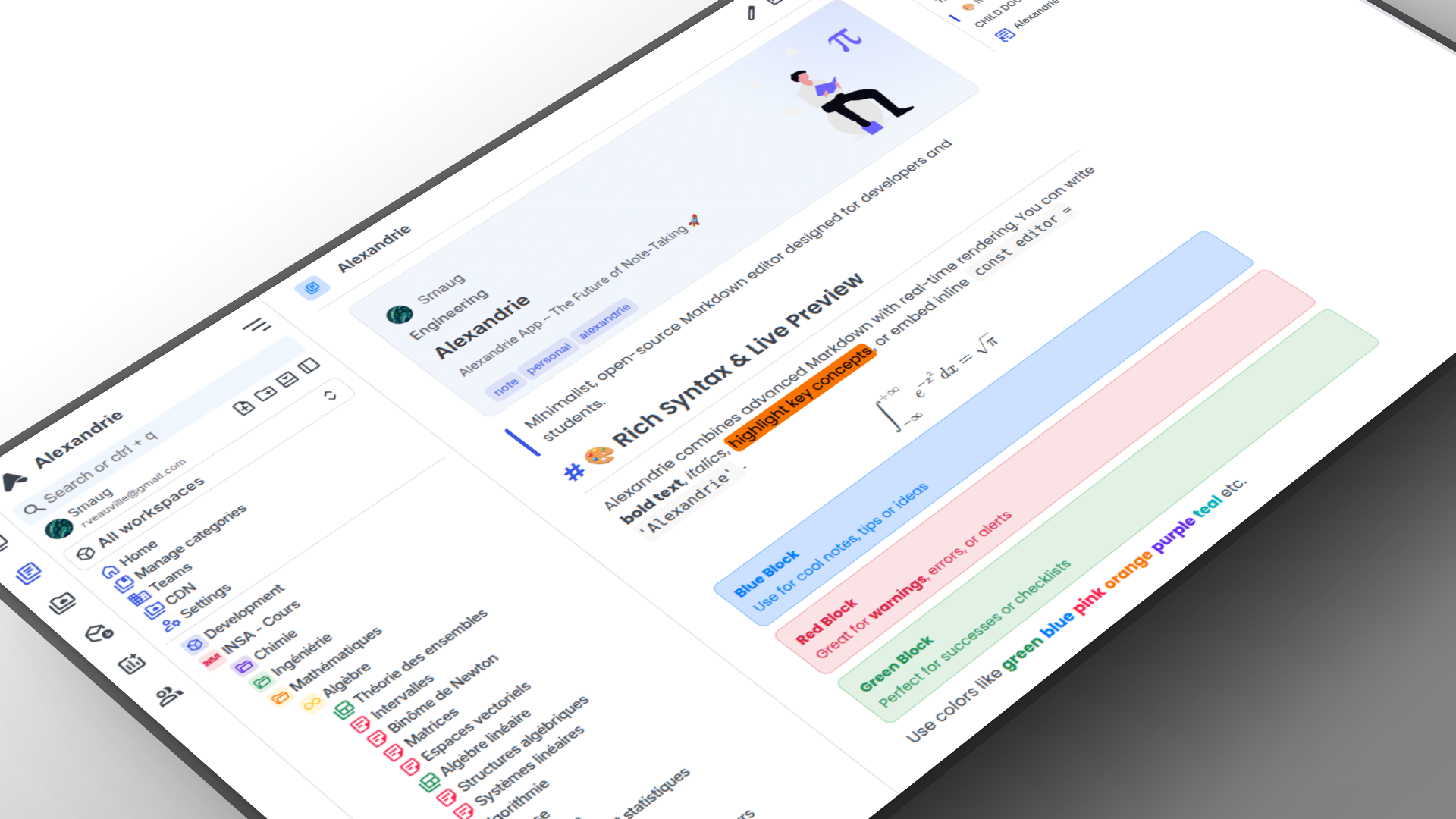
Alexandrie is an open-source, self-hosted wiki and knowledge management platform for teams and individuals. It combines an extended Markdown editor with LaTeX, diagrams and snippets, offline-first PWA support, multi-tenant workspaces with granular permissions, full-text search, and integrated Kanban boards.
Alexandrie Docker Compose example
Self-host Alexandrie on your own server, homelab, or VPS starting from this Docker Compose example.
It runs Alexandrie in Docker containers using the official mysql:8.0, rustfs/rustfs:latest, ghcr.io/smaug6739/alexandrie-backend:latest, ghcr.io/smaug6739/alexandrie-frontend:latest images, with persistent volumes and automatic restarts preconfigured.
Review the environment variables and adjust them to your setup, save the file as compose.yml (or docker-compose.yml), and start the stack with docker compose up -d.
services:
  mysql:
    image: mysql:8.0
    restart: unless-stopped
    environment:
      # Root password (MySQL is only reachable inside the compose network).
      MYSQL_ROOT_PASSWORD: "rootpassword"
      # Application database name.
      MYSQL_DATABASE: "alexandrie"
      # Application database user.
      MYSQL_USER: "alexandrie"
      # Application database password.
      MYSQL_PASSWORD: "password"
    volumes:
      - mysql_data:/var/lib/mysql
    healthcheck:
      test: ["CMD-SHELL", "mysql -ualexandrie -ppassword -e 'SELECT 1' alexandrie"]
      timeout: 10s
      retries: 5
      interval: 30s
      start_period: 30s

  rustfs:
    image: rustfs/rustfs:latest
    restart: unless-stopped
    environment:
      # S3-compatible object storage access key (used by the backend as MINIO_ACCESSKEY).
      RUSTFS_ACCESS_KEY: "alexandrie-key"
      # S3-compatible object storage secret key.
      RUSTFS_SECRET_KEY: "alexandrie-secret"
      # Enable the RustFS web console.
      RUSTFS_CONSOLE_ENABLE: "false"
      # RustFS log verbosity.
      RUSTFS_LOG_LEVEL: "info"
    volumes:
      - rustfs_data:/data
      - rustfs_logs:/logs
    healthcheck:
      test: ["CMD-SHELL", "nc -z localhost 9000 || exit 1"]
      interval: 30s
      timeout: 10s
      retries: 3
      start_period: 20s

  backend:
    image: ghcr.io/smaug6739/alexandrie-backend:latest
    restart: unless-stopped
    depends_on:
      mysql:
        condition: service_healthy
      rustfs:
        condition: service_healthy
    extra_hosts:
      - "localhost:host-gateway"
    environment:
      # Port the backend API listens on.
      BACKEND_PORT: "8201"
      # Gin framework mode (release or debug).
      GIN_MODE: "release"
      # Secret key used to sign authentication tokens. Generate a long random value.
      JWT_SECRET: "changeme"
      # Common cookie domain shared by the frontend and API (e.g. yourdomain.com).
      COOKIE_DOMAIN: "localhost:8200"
      # Public URL where the frontend is hosted (used for CORS and generated email links).
      FRONTEND_URL: "http://localhost:8200"
      # Set to "true" when running without HTTPS (e.g. local access over http).
      ALLOW_UNSECURE: "true"
      # Set to "true" to disable new user sign-up.
      CONFIG_DISABLE_SIGNUP: "false"
      # Set to "true" to disable native username/password login (OAuth only).
      CONFIG_DISABLE_NATIVE_LOGIN: "false"
      # Internal database host (the "mysql" service).
      DATABASE_HOST: "mysql"
      # Internal database port.
      DATABASE_PORT: "3306"
      # Application database name.
      DATABASE_NAME: "alexandrie"
      # Application database user.
      DATABASE_USER: "alexandrie"
      # Application database password.
      DATABASE_PASSWORD: "password"
      # Internal S3 endpoint used to store uploaded files.
      MINIO_ENDPOINT: "rustfs:9000"
      # Browser-facing URL of the object storage / CDN (leave empty to disable the CDN feature).
      MINIO_PUBLIC_URL: "http://localhost:9000"
      # Set to "true" if the S3 endpoint uses HTTPS.
      MINIO_SECURE: "false"
      # S3 access key (matches the RustFS access key above).
      MINIO_ACCESSKEY: "alexandrie-key"
      # S3 secret key (matches the RustFS secret key above).
      MINIO_SECRETKEY: "alexandrie-secret"
      # S3 bucket name used for uploads.
      MINIO_BUCKET: "alexandrie"
      # SMTP host for password-reset emails (optional).
      SMTP_HOST: ""
      # SMTP account/login (optional).
      SMTP_MAIL: ""
      # From address for outgoing email (optional).
      SMTP_MAIL_FROM: ""
      # SMTP password (optional).
      SMTP_PASSWORD: ""

  frontend:
    image: ghcr.io/smaug6739/alexandrie-frontend:latest
    restart: unless-stopped
    depends_on:
      - backend
    environment:
      # Port the frontend listens on.
      PORT: "8200"
      # Set to "true" to hide the sign-up page.
      NUXT_PUBLIC_CONFIG_DISABLE_SIGNUP_PAGE: "false"
      # Set to "true" to hide the public landing page.
      NUXT_PUBLIC_CONFIG_DISABLE_LANDING_PAGE: "false"
      # Browser-facing URL of the backend API (the "backend" service, port 8201).
      NUXT_PUBLIC_BASE_API: "http://localhost:8201"
      # Browser-facing URL of the object storage / CDN.
      NUXT_PUBLIC_BASE_CDN: "http://localhost:9000"
      # Path prefix under which uploaded files are served from the CDN bucket.
      NUXT_PUBLIC_CDN_ENDPOINT: "/alexandrie/"
      # Public URL where the frontend itself is served.
      NUXT_PUBLIC_BASE_URL: "http://localhost:8200"

volumes:
  mysql_data:
  rustfs_data:
  rustfs_logs:
Values set to changeme are required — replace them with your own
values before starting Alexandrie.
Prefer a managed setup? WinterFlow installs, configures, and updates Alexandrie for you using this same Docker Compose configuration.